
What is EID?
An EID is an identification number required to use an eSIM; it is a 32-digit number that is different for each device.
By registering the EID of the device you use eSIM with when you apply for a new service or switch your line,
you will be able to download eSIM information to the device with the registered EID.
eSIM compatible devices
You can check the EID in the Phone app in the Settings app.
*The procedure for checking may vary depending on the model and OS version.

Checking EID via phone app
You can check the EID on the phone app of an iPhone or Android smartphone that supports eSIM.
Open the phone app and enter "*#06#" to display some numbers (character strings) and a barcode.
If the EID is displayed among them, the device is capable of using eSIM, and you can check the EID on the phone app.

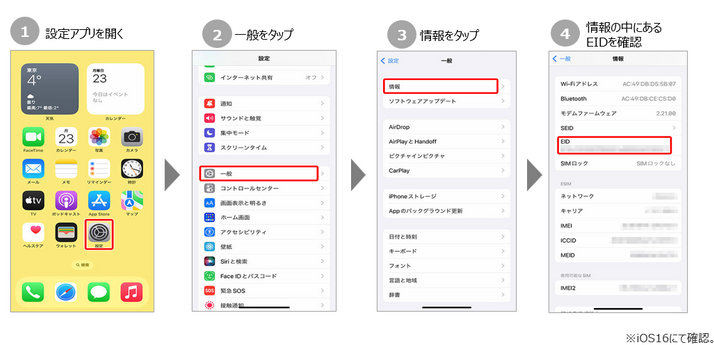
Checking EID on iPhone
On an iPhone (iOS), you can check the EID by following the steps below.
*The procedure may vary depending on the model and OS version.
Checking EID on Android
The specifications of the settings app for Android smartphones vary depending on the model, but
on a typical Android device, you can check the EID by following the steps below.
